
Call us toll free:
8619709992541 [email protected]
Jctprint Machinery Co., Ltd
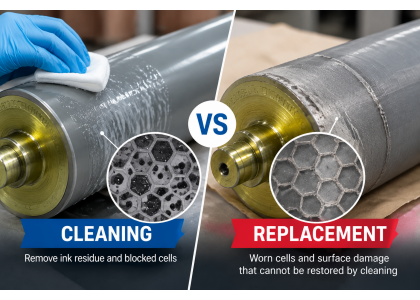
When flexographic printing quality begins to decline, the anilox roller is one of the components worth checking.
You may notice weaker color density, uneven ink transfer or increasing difficulty maintaining consistent printing results. In some cases, the problem can be resolved by cleaning the anilox roller. In others, the roller may have suffered wear or surface damage and require replacement.
How can you tell whether your anilox roller needs cleaning or replacement?
Understanding the difference can help you avoid unnecessary replacement costs while maintaining stable printing performance.
During printing, ink residue and contaminants can accumulate inside the microscopic cells of an anilox roller.
When cells become partially or completely blocked, their effective ink-carrying volume decreases. This can affect ink transfer and reduce color density.
Common signs of blocked anilox cells include:
▪️ Reduced ink transfer or color density
▪️ Uneven printing coverage
▪️ Ink residue visible on the roller surface
▪️ Printing performance that improves after proper cleaning
If the main problem is cell blockage, an appropriate cleaning process may restore some or all of the lost effective cell volume.
However, cleaning methods should be compatible with the roller's ceramic surface and follow the manufacturer's recommendations.
Cleaning cannot repair physical damage or restore ceramic material that has already worn away.
If printing performance remains poor after proper cleaning, the roller may have other problems.
Long-term operation can gradually change the cell geometry and reduce the effective cell volume.
If inspection confirms significant wear, cleaning alone will not restore the original engraving.
Scratches, chipping or other ceramic surface damage may affect ink transfer and the roller's service life.
The severity and location of the damage should be evaluated before deciding whether repair or replacement is appropriate.
If the roller repeatedly causes unstable ink transfer despite proper cleaning and maintenance, a more detailed inspection may be necessary.
A replacement may be worth considering when the existing roller can no longer meet the required printing specifications.
The appearance of an anilox roller alone does not always reveal its actual condition.
A more reliable approach is to compare the roller's measured cell volume and cell structure with its original or specified values.
Blocked cells: Deposits reduce the effective cell volume. Appropriate cleaning may improve the measured condition.
Worn cells: Physical changes to the cell geometry may reduce cell volume. Cleaning cannot reverse this wear.
Surface damage: Ceramic defects may require further technical assessment to determine whether the roller can remain in service.
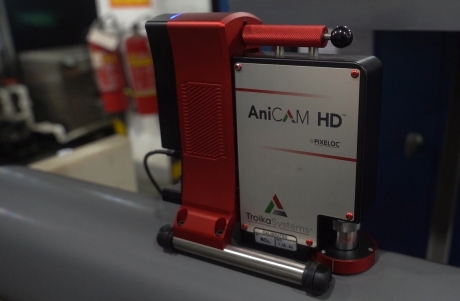
JCTPRINT uses AniCAM cell inspection equipment to examine engraved cell structures and evaluate important cell specifications.
Where measurement data is available, comparing results before and after cleaning can help determine whether the problem is primarily contamination or permanent wear.
There is no single cleaning schedule that suits every printing operation.
The appropriate frequency depends on the ink system, printing workload, production conditions and the rate at which residues accumulate.
For best results:
▪️ Follow a suitable cleaning procedure for your ink system.
▪️ Avoid cleaning methods that may damage the ceramic surface.
▪️ Inspect the roller regularly for contamination and visible damage.
▪️ Check cell condition when printing performance changes.
▪️ Keep records of cleaning, inspection and measured cell volume where possible.
Regular maintenance helps identify problems early and makes it easier to distinguish normal contamination from long-term wear.
The right decision depends on the type and severity of the problem.
Cleaning may be sufficient when ink deposits are restricting cell volume and the roller remains in good physical condition.
Repair or re-engraving may be worth evaluating when the roller's condition and construction make restoration technically feasible. The suitability and expected result should be confirmed by a qualified manufacturer.
Replacement is often the more practical option when the ceramic surface is seriously damaged, cell wear is substantial or repeated maintenance cannot restore the required printing performance.
Before making a decision, consider the inspection results, restoration cost, expected service life and potential production downtime.
If inspection confirms that your existing anilox roller needs replacement, the next step is to confirm the specifications.
Useful information includes:
▪️ Printing machine brand and model
▪️ Roller diameter and face length
▪️ Overall length and shaft-end dimensions
▪️ LPI and BCM
▪️ Engraving pattern and angle, if known
▪️ Existing roller drawing or photos
If you are unsure whether the original specifications remain suitable, provide details about your printing application as well.
JCTPRINT manufactures customized ceramic anilox rollers and anilox sleeves for CI flexo, wide-web flexo, label printing, flexible packaging and other applications.
Our production and inspection capabilities include ALE laser engraving, AniCAM cell inspection, dimensional checks, runout testing and dynamic balance testing.
We can review your existing roller specifications and help confirm the requirements for a replacement.
If your anilox roller is showing reduced ink transfer, unstable color density or repeated printing problems, do not rely on appearance alone.
Start by checking the cleaning history, inspecting the ceramic surface and evaluating the cell condition. If significant wear or damage is confirmed, a customized replacement may be the better long-term solution.
Send JCTPRINT your existing roller specifications, photos or technical drawing. Our team can review your requirements and help you explore a suitable replacement anilox roller solution.


