
Call us toll free:
8619709992541 [email protected]
Jctprint Machinery Co., Ltd
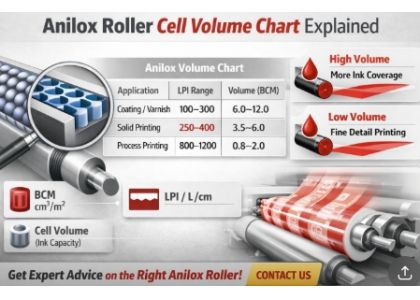
In flexographic printing and coating applications, understanding the anilox roller cell volume chart is essential for achieving consistent ink transfer and high-quality results.
Many printers struggle with issues like:
● Inconsistent color density
● Over-inking or ink starvation
● Poor print sharpness
In most cases, these problems are directly related to selecting the wrong anilox cell volume.
This guide will help you clearly understand how to read and use an anilox volume chart—with practical examples to improve your production.
Cell volume refers to the amount of ink that the engraved cells on an anilox roller can carry and transfer to the printing plate. It is typically measured in:
● BCM (Billion Cubic Microns per square inch)
● Or cm³/m²
◼ Simply put:
Higher volume = more ink transfer
Lower volume = finer ink control
A typical anilox volume chart shows the relationship between:
● Line screen (LPI or L/cm)
● Cell volume (BCM)
● Application type
| Application | LPI Range | Volume (BCM) |
|---|---|---|
| Coating / Varnish | 100–300 | 6.0 – 12.0 |
| Solid Printing | 200–400 | 3.0 – 6.0 |
| Line Work | 400–800 | 1.5 – 3.0 |
| Process Printing | 800–1200 | 0.8 – 2.0 |
◼ This is not a fixed rule—actual selection depends on ink type, substrate, and machine speed.
For film printing (BOPP, PET):
• Recommended: 800–1000 LPI / 1.0–1.8 BCM
◼ Why:
• Ensures fine details
• Prevents dot gain
• Improves image clarity
For kraft paper or carton:
• Recommended: 250–400 LPI / 3.5–6.0 BCM
◼ Why:
• Rough surface requires more ink
• Higher volume improves coverage
For glue or varnish coating:
• Recommended: 150–300 LPI / 6.0–10.0 BCM
◼ Why:
• Heavy coating needs larger ink volume
• Ensures uniform layer thickness
Many users focus only on line count and ignore volume.
◼ Result: Incorrect ink transfer
Different inks (water-based, solvent, UV) behave differently.
◼ Always adjust volume accordingly.
Charts are guidelines—not absolute rules.
◼ Always test before finalizing.
To select the correct anilox roller, consider:
• Printing type (solid, line, process)
• Substrate (film, paper, foil)
• Ink system
• Printing speed
◼ The best approach is to combine experience + testing + precise measurement data.
Even a small deviation in cell volume can affect print quality.
At JCTPRINT, every anilox roller is inspected using advanced AniCAM detection systems, ensuring:
• Accurate cell volume control
• Consistent engraving quality
• Reliable production performance
Additionally:
• Each roller undergoes strict quality checks
• Dimensions and tolerances are verified multiple times
• Stable performance is guaranteed
With over 20 years of experience, JCTPRINT provides:
• High-precision ceramic anilox rollers
• Full range of anilox sleeves
• Advanced coating technology (Oerlikon system)
• Compatibility with global flexo machines
• Exported to 40+ countries
◼ We don’t just supply rollers—we help optimize your printing results.
Not sure which anilox volume is right for your application?
◼ Contact JCTPRINT today for a free technical consultation.
Our engineers will help you:
• Select the right LPI & volume
• Match your ink and substrate
• Improve print quality and reduce waste
Send us your printing details and get a customized recommendation.


