
Call us toll free:
8619709992541 [email protected]
Jctprint Machinery Co., Ltd
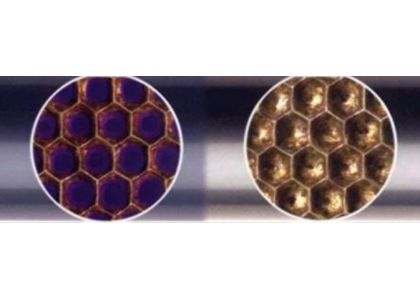
In flexographic printing and coating applications, the anilox roller plays a critical role in controlling ink and coating transfer. However, many printers experience a common problem: the anilox roller becomes plugged much faster than expected.
When an anilox roller is clogged, ink transfer decreases, print density becomes inconsistent, colors appear weak, and overall print quality suffers. Frequent cleaning also increases downtime and maintenance costs.
So why does an anilox roller plug so quickly? Understanding the causes can help you improve print performance and extend the life of your roller.
Anilox roller plugging occurs when dried ink, coating residue, dust, paper fibers, or contaminants accumulate inside the engraved cells of the roller. As the cells become partially or completely blocked, they can no longer carry the designed volume of ink or coating.
Common signs of plugged anilox cells include:
One of the most common causes of rapid plugging is insufficient cleaning.
Many printing facilities rely only on daily manual cleaning. While this removes surface ink, it often fails to clean deep inside the anilox cells. Over time, residual ink hardens and gradually blocks the cell openings.
For water-based inks, dried pigment and additives can accumulate quickly. UV inks may leave cured residues if cleaning is delayed.
Recommendation:
Using the wrong cell volume or line screen can accelerate plugging.
High line count anilox rollers have smaller and shallower cells. While they provide excellent detail for fine printing, they are also more sensitive to contamination and dried ink buildup.
For example:
Recommendation:
Choose an anilox specification that matches your application, ink system, and production environment.
Ink quality directly affects anilox cleanliness.
Issues such as:
can all contribute to faster cell blockage.
When ink dries too quickly or contains excessive solid particles, residues can accumulate inside the cells and become difficult to remove.
Recommendation:
Many operators leave the anilox roller uncleaned after a production run, especially during shift changes or weekends.
Even a few hours of downtime can allow ink to dry inside the cells. Once hardened, residues become much more difficult to remove and may require intensive cleaning methods.
Recommendation:
Develop a standard cleaning procedure that begins immediately after production stops.
The quality of the ceramic coating significantly affects long-term performance.
Low-quality ceramic coatings may have:
These imperfections can trap ink particles and contaminants more easily, increasing the likelihood of plugging.
High-quality ceramic anilox rollers typically feature dense plasma-sprayed ceramic coatings with superior hardness and durability.
Over time, improper cleaning methods can damage anilox cells.
Examples include:
Damaged cells create irregular surfaces where ink and debris can accumulate more easily.
Recommendation:
Use professional cleaning methods designed specifically for ceramic anilox rollers.
Many plugging issues develop gradually and go unnoticed until print quality declines.
Without regular inspection, operators may not detect:
Modern inspection systems can identify problems early and help maintain consistent printing performance.
To reduce plugging and maximize roller performance:
These practices can significantly reduce downtime, improve print consistency, and extend the service life of your anilox rollers.
JCTPRINT specializes in manufacturing high-performance ceramic anilox rollers for flexographic printing and coating applications.
Our advantages include:
Rapid anilox roller plugging is usually caused by a combination of cleaning practices, ink management, roller specifications, and maintenance routines. By identifying the root causes and implementing preventive measures, printers can reduce downtime, improve print quality, and maximize the lifespan of their anilox rollers.


